
Formula Use Cases
Formulas can be used in several product areas to calculate values, decide whether actions should run, choose notification recipients, and convert measurement units. Each formula context exposes a specific set of variables.
Preferred Unit Conversion
See Measurement profile settings for more information
This use case converts a raw source measurement value into a preferred display unit. The formula must return a number.
Available variables:
|
Variable |
Path |
Value |
|---|---|---|
|
|
|
The raw numeric source value being converted. |
Example using SOURCE:
{
  "type": "arithmeticOperation",
  "operator": "*",
  "operands": [
    { "type": "variable", "path": ["SOURCE"] },
    { "type": "constant", "value": 0.001 }
  ]
}
Reverse Preferred Unit Conversion
See Measurement profile settings for more information
This use case converts a preferred-unit value back into the raw source unit. The formula must return a number.
Available variables:
|
Variable |
Path |
Value |
|---|---|---|
|
|
|
The numeric value in the preferred unit. |
Example using PREFERRED:
{
  "type": "arithmeticOperation",
  "operator": "/",
  "operands": [
    { "type": "variable", "path": ["PREFERRED"] },
    { "type": "constant", "value": 0.001 }
  ]
}
Calculated Asset Attributes
This use case calculates asset custom_data attributes from formulas defined on an asset type schema. The formula is evaluated against the merged incoming and existing asset data.
Available variables:
|
Variable |
Path |
Value |
|---|---|---|
|
|
|
The current asset being evaluated. Common custom data paths look like |
|
|
|
Descendant assets of the requested asset type in the current asset tree. Each child includes |
Example using asset:
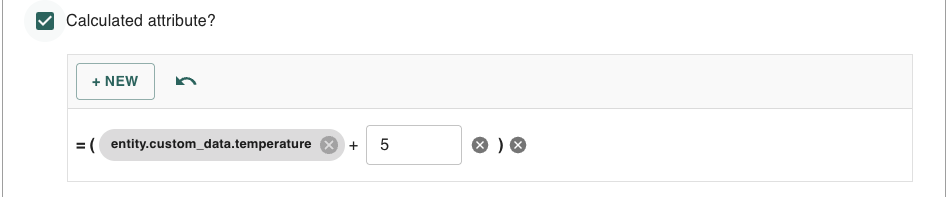
{
  "type": "arithmeticOperation",
  "operator": "+",
  "operands": [
    { "type": "variable", "path": ["asset", "custom_data", "temperature"] },
    { "type": "constant", "value": 5 }
  ]
}
Example using childrenOfType:
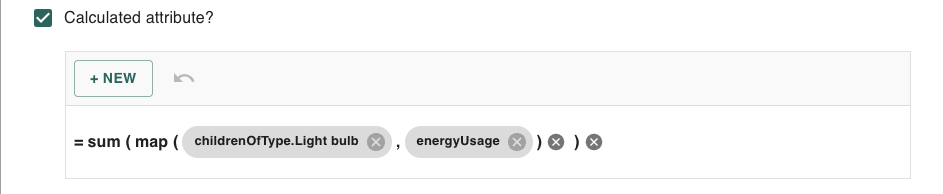
{
  "type": "aggregateFunction",
  "operator": "sum",
  "operands": [
    {
      "type": "arrayFunction",
      "operator": "map",
      "operands": [
        {
          "type": "variable",
          "path": ["childrenOfType"],
          "params": { "type": "lightBulb" }
        },
        { "type": "variable", "path": ["$arrayItem", "custom_data", "energyUsage"] }
      ]
    }
  ]
}
Notification Recipient Formula
This use case computes notification recipients for email and SMS actions. The formula runs against the trigger message. It may return a comma-separated string or an array of strings.
Available variables:
|
Variable |
Path |
Value |
|---|---|---|
|
|
|
The trigger message for the action. Common custom data paths look like |
Example using entity:

{
  "type": "conditionalFunction",
  "operator": "if",
  "operands": [
    { "type": "variable", "path": ["entity", "custom_data", "sendToSupervisor"] },
    { "type": "variable", "path": ["entity", "custom_data", "supervisorEmail"] },
    { "type": "constant", "value": "ops@example.com" }
  ]
}
Rule Event Attribute Formula
This use case calculates custom event attributes for a rule-created event. The formula runs against the incoming entity and stores the result under the configured event attribute name.
Available variables:
|
Variable |
Path |
Value |
|---|---|---|
|
|
|
The incoming entity that triggered the rule. Common custom data paths look like |
Example using entity:
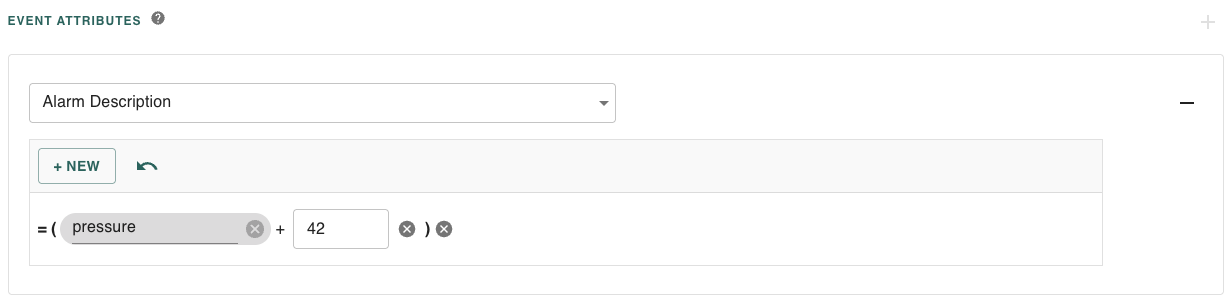
{
  "type": "arithmeticOperation",
  "operator": "+",
  "operands": [
    { "type": "variable", "path": ["entity", "custom_data", "pressure"] },
    { "type": "constant", "value": 42 },
  ]
}
Action Enabled Formula
This use case decides whether an action should run. The formula runs against the rule trigger message and must return a boolean. A null or undefined result disables the action.
Available variables:
|
Variable |
Path |
Value |
|---|---|---|
|
|
|
The trigger message for the rule action. Common custom data paths look like |
Example using entity:

{
  "type": "logicalOperation",
  "operator": "AND",
  "operands": [
    { "type": "variable", "path": ["entity", "custom_data", "notificationsEnabled"] },
    {
      "type": "comparisonOperation",
      "operator": ">=",
      "operands": [
        { "type": "variable", "path": ["entity", "custom_data", "severity"] },
        { "type": "constant", "value": 3 }
      ]
    }
  ]
}
Rule Expression Condition Evaluation
This use case evaluates rule expression conditions. The formula must return a boolean. Variables with paths like ["entity", "custom_data", "<property>"] identify the custom data fields required for evaluation.
Available variables:
|
Variable |
Path |
Value |
|---|---|---|
|
|
|
The incoming entity or related entity being evaluated by the rule condition. Common custom data paths look like |
Example using entity:
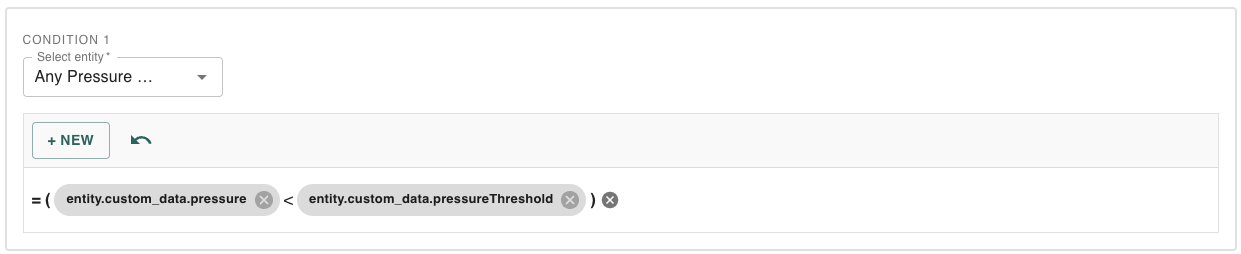
{
  "type": "comparisonOperation",
  "operator": "<",
  "operands": [
    { "type": "variable", "path": ["entity", "custom_data", "pressure"] },
    { "type": "variable", "path": ["entity", "custom_data", "pressureThreshold"] }
  ]
}