
Throttling
Overview
Throttler Management protects a ClearBlade Platform from excessive or abusive traffic by defining rate and concurrency limits on three fixed categories of activity: HTTP API requests, MQTT connections, and MQTT publishes. Instead of writing custom enforcement logic, throttling is configured via declarative cases. These are rules that match a system, a consumer, and (where applicable) a resource, and apply a limit to anything matching them.
This page is a complete reference for designing, deploying, and operating a throttling strategy: the underlying concepts, exact matching and limiting semantics, the equivalent console workflow, the full REST API, worked examples, and a troubleshooting/FAQ section.
Core concepts
Throttlers vs. cases
There are exactly three throttlers, and they are fixed. The throttlers cannot be created, renamed, or deleted. Configuration is done by creating cases within each throttler:
|
Throttler |
Fires on |
Consumer identifies |
Resource identifies |
|---|---|---|---|
|
|
Every platform API call |
|
The request URI / endpoint path |
|
|
Every MQTT |
|
Not applicable — must be left empty |
|
|
Every MQTT |
|
The MQTT topic path |
A case is a rule that says: "for this system key, this consumer, and (if applicable) this resource, apply this limit." Each throttler can hold any number of cases, and every request evaluated against that throttler is checked against the case list to find the one rule that governs it.
Who is subject to throttling
Requests authenticated as a developer's own platform login (a dev-level identity) bypass throttling entirely. Only end-user, device, and anonymous/unauthenticated traffic is subject to enforcement. Hence a developer can always administer or test a system without being blocked by throttles.
What happens when a limit is hit
-
HTTP Requests: the caller receives
HTTP 429 Too Many Requests. -
MQTT Connections: the broker rejects the
CONNECTwith a "connection rate exceeded" reason code and closes the connection. -
MQTT Publishes: the publish is rejected.
How case evaluation works
For a given throttler, every case has a priority (a positive integer). When a request comes in:
-
All cases for that throttler are sorted ascending by priority. Lower number evaluates first.
-
The platform walks the list in that order and checks each case's
system_key,resource(if applicable), andconsumerfilters against the request. -
The first case whose filters all match wins. Its limiter is applied, and evaluation stops immediately.
-
If no case matches, the request is not throttled at all.
This is a first-match-wins model. If multiple cases would all technically match a request, only the highest-priority (lowest-number) one of them is ever evaluated or enforced.
Priority ordering used for whitelisting
There is no dedicated whitelist, exclusion list, or "bypass" field in a case. These are not needed because evaluation stops on the first match. Whitelisting is achieved simply by giving "allow" cases lower priority numbers than the stricter cases they should override.
For example: if a specific, trusted consumer must be exempt from a strict per-consumer rate limit, then an allow-case should be created scoped to that consumer with max_num=-1 (unlimited) and a priority number smaller than the blocking case's priority. The allow case matches first, wins, and the blocking case is never reached for that consumer. Everyone else falls through to the stricter case as normal. See Allow-list in front of a stricter block below for a complete walkthrough.
Note that the platform's own built-in default cases run at priority=200 (see Built-in default cases below). Any custom case with a priority below 200 will evaluate before the built-in default cases.
Fields reference
Each case is a JSON object with the following fields:
|
Field |
Type |
Required |
Notes |
|---|---|---|---|
|
|
string |
Yes (as URL path segment on create) |
One of |
|
|
string |
Yes |
Unique name for this case within its throttler |
|
|
string |
Yes |
Exact system key, |
|
|
string |
Yes |
See Consumer field below |
|
|
string |
Conditionally |
Required for |
|
|
string |
Yes |
|
|
|
integer |
Yes |
|
|
|
integer (seconds) |
Frequency only |
Ignored for |
|
|
integer, must be > 0 |
Yes |
Lower number is evaluated first |
Consumer field
The consumer field supports two formats.
1. Legacy single-value format: a bare string, matched against whichever identifying attribute (email, device name, or IP) the request actually carries:
-
An exact value (e.g.
jane@example.comor203.0.113.7) matches only that consumer. -
?gives each distinct consumer value its own independent bucket — i.e., "limit everyone individually." -
*pools all consumers into a single shared bucket — i.e., "limit everyone collectively."
2. Typed/slotted format: email=<value|?|*>,ip_address=<value|?|*> (comma-separated slot=filter pairs). Unlike the legacy format, this allows pinning a case to a specific attribute and ignore the other.
Note that the email slot holds whichever identity the requester actually has. It can be a user's email address, OR a device's name. The console's own field label spells this out as Consumer (User, Device Name, or IP).
For example…
* These match purely on source `ip_address` regardless of which `email` (if any) is present:

    * `ip_address=203.0.113.7`
    * `ip_address=203.0.113.7,email=*`
    * `ip_address=?`
    * `ip_address=?,email=*`

* These match purely on source `email` (again, this COULD be a device name) regardless of which `ip_address` (if any) is present:

    * `email=jane@example.com`
    * `email=jane@example.com,ip_address=*`
    * `email=device-042`
    * `email=device-042,ip_address=*`
    * `email=?`
    * `email=?,ip_address=*`
Resource field
resource applies only to HTTP Requests (endpoint path) and MQTT Publishes (topic path); it must be left empty for MQTT Connections. It supports three matching styles:
-
An exact string.
-
?/*wildcards. -
A route-pattern string (must contain a
/), evaluated using the same route-matching engine the platform uses to register its own API routes. This supports{paramName}path-segment placeholders and a trailing catch-all segment.
Route patterns are the most useful style for real systems:
-
/api/v/1/code/{systemKey}/registerUser— matches that endpoint exactly, for any system key value in that position (useful when a case should apply irrespective ofsystem_key, or in combination with asystem_key=?/*wildcard). -
/api/v/1/code/{systemKey}/*— a catch-all that covers every code-service endpoint across all systems in one case, instead of enumerating each one.
For MQTT Publishes, the same pattern syntax applies to topic paths, so an entire topic tree (e.g. devices/{deviceId}/*) can be throttled with a single case.
Limiter semantics
There are two limiter types, and they behave quite differently. This distinction matters when deciding what kind of protection is needed.
Concurrency limiter
A concurrency limiter tracks a simple in-flight counter per case-match key (the combination of system, resource, and consumer that the case resolved to). On every request:
-
The counter increments.
-
If the new count exceeds
max_num, the request is rejected immediately.
Concurrency limiters never queue requests. Hence there is no "wait your turn" behavior. A rejection happens the instant capacity is exceeded, and the caller must retry on its own. max_num=-1 means unlimited concurrent in-flight requests for that match.
duration is ignored for concurrency limiters.
Frequency limiter
Frequency limiters govern rate (number of requests per unit of time). Frequency limiters can be in one of two modes: Default or Global. The mode is set by a server-wide Boolean Configuration parameter: EnableGlobalThrottlers.
Default mode (EnableGlobalThrottlers=false, the default): a per-node token bucket. Picture a small bucket that holds up to max_num tokens, where each token represents one request the case is still willing to let through. Every allowed request removes one token from the bucket; if the bucket is empty, the request is throttled instead. Tokens refill automatically over time — one new token every duration / max_num seconds — up to that same max_num cap, so idle time never lets the bucket bank more than its capacity. The result is a continuously changing rate limit: capacity trickles back a little at a time instead of resetting all at once at a window boundary, so a throttled consumer isn't stuck waiting for some window to fully reset — they simply regain a fraction of their allowance as time passes.
Example — a case with max_num=2, duration=60 (one token refills every 30s), first request at t=0s, then one request every 14s:
|
Time |
Tokens before request |
Result |
|---|---|---|
|
0s |
2 (full) |
Allowed |
|
14s |
1 |
Allowed |
|
28s |
0 |
Throttled |
|
42s |
1 (just refilled) |
Allowed |
|
56s |
0 |
Throttled |
|
70s |
1 (just refilled) |
Allowed |
|
84s |
0 |
Throttled |
|
98s |
1 (just refilled) |
Allowed |
|
112s |
0 |
Throttled |
Notice recovery at 42s comes just one 30-second refill after being throttled at 28s — there's no fixed window the consumer has to wait out.
Global mode (EnableGlobalThrottlers=true, requires Redis as the platform's key-value store): a Redis-backed fixed window, shared cluster-wide. Every node increments the same counter in Redis. That counter's window is created — and its TTL started — by whichever request is the first to arrive after the previous window closed, and every node shares this same counter and TTL. Once the count exceeds max_num within that window, every further request is denied for the remainder of the window; only then does the counter reset to zero and a new window begin. This is the classic "hard block until the window rolls over" behavior, enforced identically no matter which node in the cluster handles the request.
Example — same case (max_num=2, duration=60) and same request pattern (one every 14s, starting at t=0s), for direct comparison with Default mode above:
|
Time |
Window |
Count |
Result |
|---|---|---|---|
|
0s |
[0s, 60s) opens |
1 |
Allowed |
|
14s |
[0s, 60s) |
2 |
Allowed |
|
28s |
[0s, 60s) |
3 |
Throttled |
|
42s |
[0s, 60s) |
4 |
Throttled |
|
56s |
[0s, 60s) |
5 |
Throttled |
|
70s |
[70s, 130s) opens |
1 |
Allowed |
|
84s |
[70s, 130s) |
2 |
Allowed |
|
98s |
[70s, 130s) |
3 |
Throttled |
|
112s |
[70s, 130s) |
4 |
Throttled |
Compare the two tables at 42s and 84s: Default mode allows the 42s attempt but Global mode throttles it, and the reverse happens at 84s (the same divergence recurs again at 98s). Same nominal limit, same traffic, genuinely different outcomes — which is why the two modes aren't interchangeable even when configured with identical numbers.
If Redis becomes unreachable while global mode is enabled, each node falls back independently to its own local token-bucket counter. This means during a Redis outage, an N-node cluster can effectively allow up to N times the configured limit in aggregate until Redis recovers. Redis availability should be considered if the Global mode's exactness is required.
For both modes: max_num=0 is a permanent hard block for anything matching the case; max_num=-1 means unlimited.
Choosing between the two modes: pick Global mode when exact, cluster-wide enforcement of a hard limit (e.g. a compliance-driven rate cap) is required. Pick Default mode when low latency and best-effort enforcement is good enough. Default mode offers lower latency by avoiding the Redis round-trip used in the Global mode.
Note: if an environment is hosted by ClearBlade then ClearBlade support personnel should be contacted to find out and/or change the value of EnableGlobalThrottlers.
Built-in default cases
Unless disabled, two default cases are always present and active out of the box:
|
Case |
Throttler |
Resource |
Type |
Limit |
Consumer scope |
|---|---|---|---|---|---|
|
Block brute force auth |
|
|
frequency |
3 per 600 seconds |
Per system, per consumer ( |
|
Block brute force password reset core api |
|
|
frequency |
3 per 600 seconds |
Per system, per consumer ( |
Both run at priority=200. While these default cases are active, the API rejects any attempt to delete or modify them directly returning an error naming the protected case. If different behavior is needed for these endpoints, add a custom case with a lower priority number so it wins the match first (the same allow-list pattern described above), or disable default throttlers entirely via server configuration.
These defaults are controlled by the server-wide EnableDefaultThrottlers setting (default true), and are automatically disabled whenever the server is running in DevelopmentMode. If these are disabled and replaced with custom, equivalent cases, then those cases should be named using a custom naming prefix in order to prevent naming conflicts with current and future built-in default cases.
Operator settings (server-wide configuration)
These are platform-level settings, not per-case fields. Setting these requires low-level access to the environment’s infrastructure:
|
Setting |
Default |
Effect |
|---|---|---|
|
|
|
Enables/disables the two built-in brute-force-protection cases described above |
|
|
|
Switches frequency limiters from per-node token-bucket to Redis-backed cluster-wide fixed window. Requires the platform's KV store to be configured as Redis — without Redis, frequency limiters silently fall back to per-node counting even with this set to |
|
|
|
When enabled, automatically disables the default throttlers regardless of |
Using the console
Most day-to-day case management can be done directly from the console, at Admin Management → Throttling — no API calls required. It's the same underlying data as the REST API described below: a case created via the console shows up in GET /admin/throttlers, and vice versa, so the two are safe to mix — e.g. bulk-load cases via the API and hand-tune one from the console.
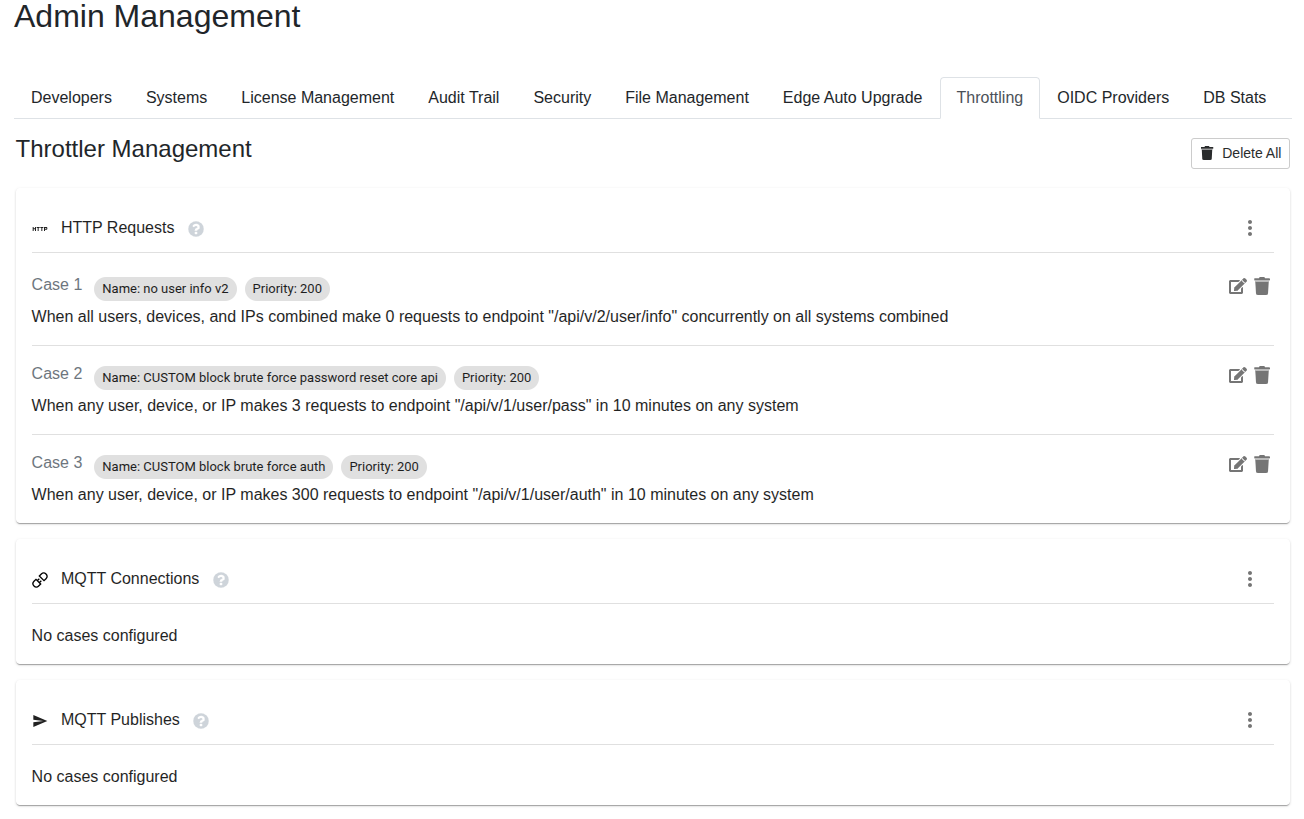
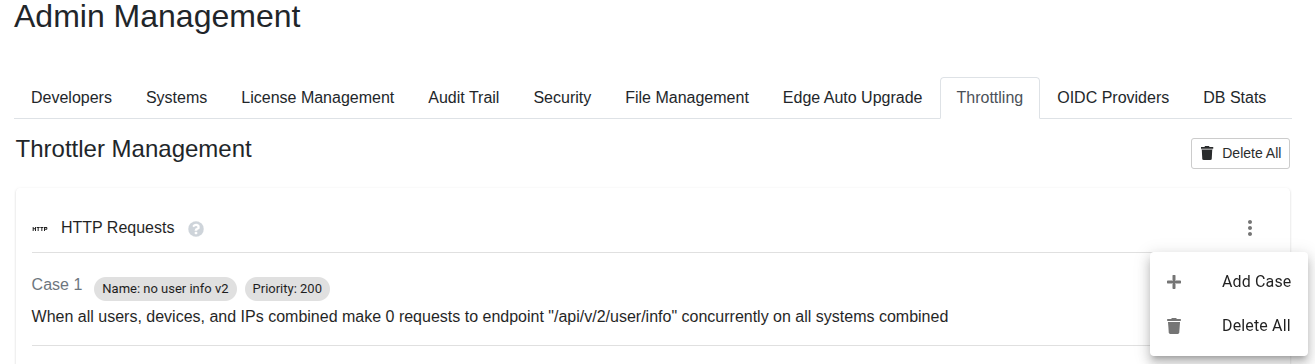
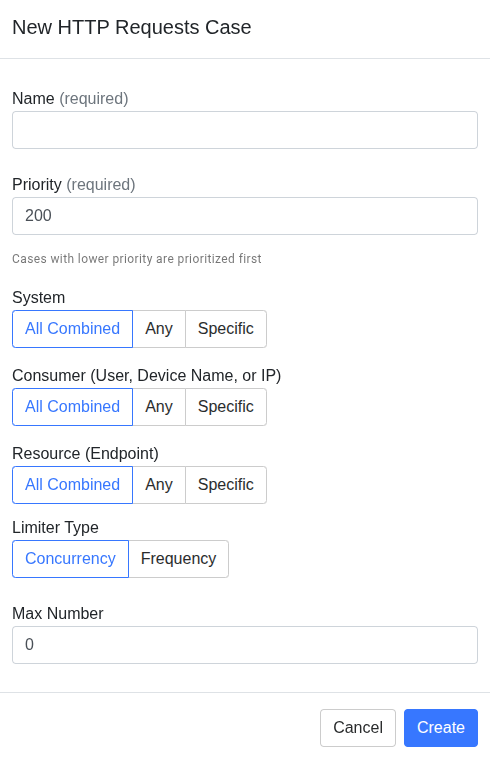
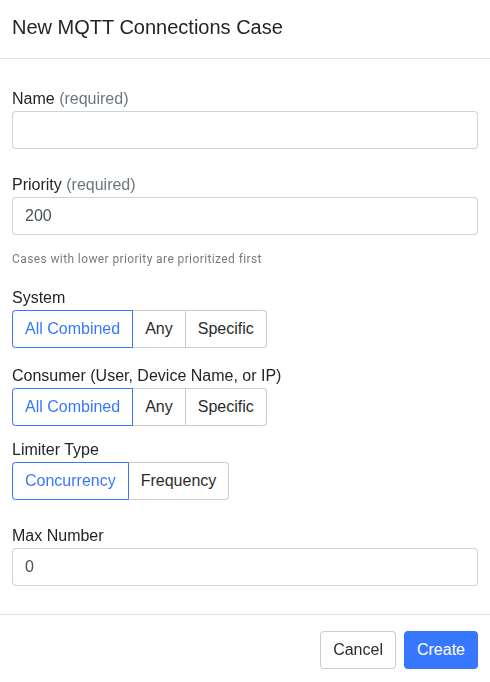
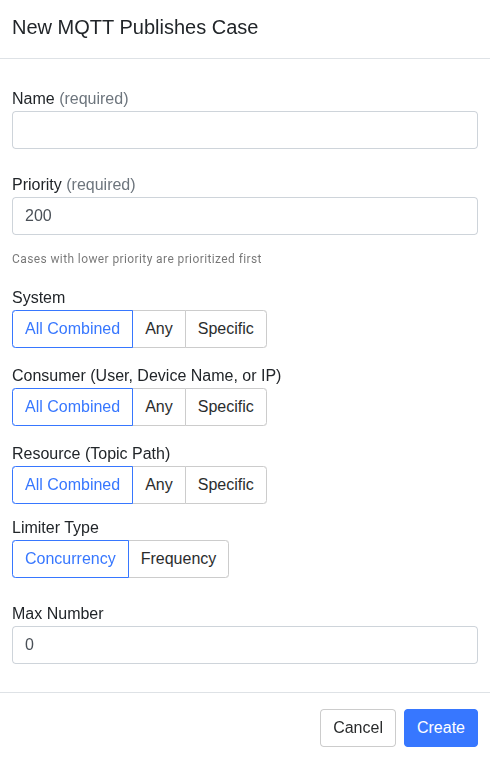
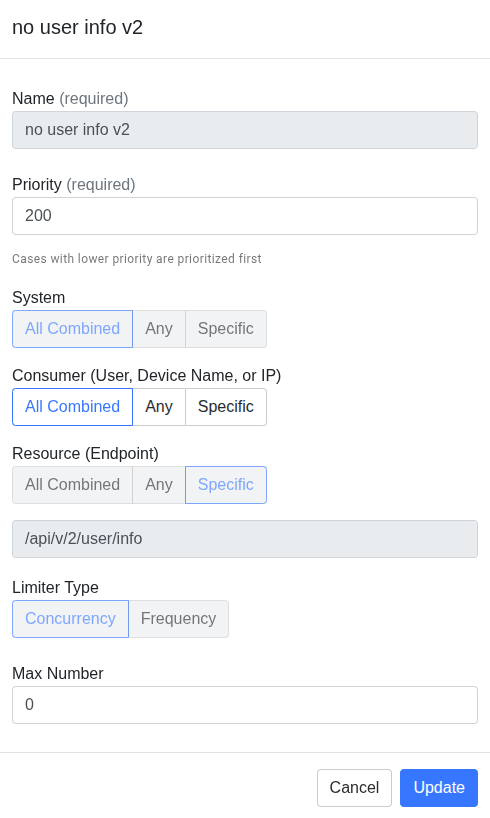
The pencil icon on an existing case opens this same form, pre-filled. This is the console's equivalent of PUT on that case (see REST API reference below). Name is shown grayed out here. In this UI, gray means genuinely not editable, not just visually muted. So cases cannot be renamed this way. They must be deleted and recreated.
The case's Specific resource value is grayed out the same way, so the exact value behind a Specific filter can't be changed post-creation either. Priority, the three-way match toggles, Limiter Type, and Max Number all remain editable (shown in white, not gray).
Each case has a Name (case_name) and Priority (priority) followed by one auto-generated plain-English sentence that encodes the rest of the case's fields (system_key, consumer, resource, limiter_type, max_num, duration) in a single readable line, for example: "When any user, device, or IP makes 3 requests to endpoint '/api/v/1/user/pass' in 10 minutes on any system." Each row has pencil (edit) and trash (delete) icons for that one case, equivalent to PUT/DELETE on /admin/throttlers/{throttlerName}/cases/{caseName} (see REST API reference below).
REST API reference
Everything described in Using the console above can also be managed over HTTP. Most day-to-day changes are easiest from the console. Use this API for:
-
Managing cases as code
-
Script bulk changes
-
Drive throttling configuration from a CI/CD pipeline
All Throttler Management endpoints live under /admin/throttlers and require platform admin-level authentication, i.e. an admin user session or a developer token. Regular end-user tokens and device tokens cannot call these endpoints.
{throttlerName} in any path below must be one of the three exact throttler names: HTTP Requests, MQTT Connections, or MQTT Publishes. It must be URL-encoded (e.g. HTTP%20Requests).
List all throttlers
GET /admin/throttlers
Returns all three throttlers along with every case currently defined on each.
Get a single throttler
GET /admin/throttlers/{throttlerName}
Returns one throttler and its full case list.
Create a case
POST /admin/throttlers/{throttlerName}/cases
Body is a case object (see Fields reference above). Note there is no GET or PUT on the collection path itself. Creation always happens via POST, and updates target a specific case by name (below). Example body for a frequency case:
{
  "case_name": "limit-registerUser-per-ip",
  "system_key": "?",
  "consumer": "ip_address=?",
  "resource": "/api/v/1/code/{systemKey}/registerUser",
  "limiter_type": "frequency",
  "max_num": 10,
  "duration": 60,
  "priority": 50
}
Update a case
PUT /admin/throttlers/{throttlerName}/cases/{caseName}
Accepts a partial-field update. Only the fields being changed need to be included, NOT the full case object.
Delete a single case
DELETE /admin/throttlers/{throttlerName}/cases/{caseName}
Delete all cases for one throttler
DELETE /admin/throttlers/{throttlerName}
Delete every case across all three throttlers
DELETE /admin/throttlers
Use with caution. It clears the entire throttling configuration across HTTP Requests, MQTT Connections, and MQTT Publishes in one call. The protected built-in default cases, if enabled, are not deletable this way either. See Built-in default cases above.
Examples
Allow-list in front of a stricter block
This is the pattern for rate-limiting all but a small set of trusted consumers using the priority-ordering behavior described earlier.
Goal: limit HTTP Requests to /api/v/1/code/mySystem/heavyOperation to 5 requests per minute per consumer, except for one trusted internal IP address which should be unlimited.
Step 1 — create the allow case first, at a lower priority number:
{
  "case_name": "trusted-ip-unlimited",
  "system_key": "mySystem",
  "consumer": "ip_address=198.51.100.20",
  "resource": "/api/v/1/code/mySystem/heavyOperation",
  "limiter_type": "frequency",
  "max_num": -1,
  "duration": 60,
  "priority": 10
}
Step 2 — create the general blocking case at a higher priority number (i.e. it is evaluated AFTER the case with the lower priority number):
{
  "case_name": "heavyOperation-general-limit",
  "system_key": "mySystem",
  "consumer": "ip_address=?",
  "resource": "/api/v/1/code/mySystem/heavyOperation",
  "limiter_type": "frequency",
  "max_num": 5,
  "duration": 60,
  "priority": 100
}
Result: for a request from 198.51.100.20, the platform evaluates trusted-ip-unlimited first (priority 10 < 100), the consumer filter matches, and evaluation stops there. heavyOperation-general-limit is never consulted. For every other IP, trusted-ip-unlimited's consumer filter doesn't match, so evaluation falls through to heavyOperation-general-limit, which enforces 5/minute per distinct IP.
No separate whitelist or exclusion mechanism is needed. Priority ordering plus a max_num=-1 allow case is the native whitelist mechanism. Note that "trusted IP" here means one exact address per allow case; a range of trusted addresses requires one case per address.
Covering a whole service with one case
Rather than writing a separate case for every endpoint in a service, use a catch-all route pattern:
{
  "case_name": "code-service-per-system-limit",
  "system_key": "?",
  "consumer": "?",
  "resource": "/api/v/1/code/{systemKey}/*",
  "limiter_type": "frequency",
  "max_num": 100,
  "duration": 60,
  "priority": 150
}
system_key: "?" gives every system its own independent bucket, consumer: "?" gives every consumer within a system their own independent bucket, and the trailing * on the resource pattern covers every code-service endpoint. This keeps the case list small and helps performance. See Scope and performance at scale below.
Concurrency cap on MQTT publishes
To cap how many in-flight publishes a single device can have on a topic tree at once:
{
  "case_name": "device-publish-concurrency-cap",
  "system_key": "mySystem",
  "consumer": "?",
  "resource": "devices/{deviceId}/telemetry/*",
  "limiter_type": "concurrency",
  "max_num": 20,
  "priority": 100
}
Any publish beyond 20 simultaneously in-flight for a given consumer on that topic pattern is rejected immediately. There is no queueing.
Propagation and enforcement timing
Case changes take effect immediately. When a case is created, updated or deleted, the originating node reloads its in-memory case list right away and broadcasts the change to every other node in the cluster. The other nodes reload their in-memory case lists in turn. The whole process completes within roughly one RPC round-trip. There is no restart required and no meaningful propagation delay to design around. Treat case changes as live the moment the API call, or console action, returns successfully.
Observability and auditing
If the platform server has Prometheus metrics enabled, two metrics are emitted:
-
A counter of throttled/denied requests, per throttler type (
HTTP Requests,MQTT Connections,MQTT Publishes). These are not broken out per case or per consumer. -
A histogram of case-evaluation latency.
These give aggregate visibility (e.g. "how often is MQTT Publishes rejecting traffic right now"). To know exactly which case is blocking a specific consumer, temporarily isolate the suspect case. This can be done by narrowing the case’s filters and/or raising its priority (i.e. by lowering its priority NUMBER) so it evaluates alone.
For example…
Let’s say we suspect that THIS case is throttling a specific consumer:
{
    "case_name": "code-service-per-system-limit",
    "system_key": "?",
    "consumer": "?",
    "resource": "/api/v/1/code/{systemKey}/*",
    "limiter_type": "frequency",
    "max_num": 100,
    "duration": 60,
    "priority": 150
  }
We can change the case to the following which has a higher priority (i.e. lower priority NUMBER) and narrower filters:
{
    "case_name": "code-service-per-system-limit-DEBUG",
    "system_key": "mySystem",
    "consumer": "email=jane@example.com",
    "resource": "/api/v/1/code/mySystem/heavyOperation",
    "limiter_type": "frequency",
    "max_num": 100,
    "duration": 60,
    "priority": 1
  }
If the consumer’s behavior remains UNCHANGED then we can be confident that the suspected case WAS the one throttling the consumer.
If the consumer’s behavior CHANGES that means the original case was NOT the one throttling the consumer. A different case with a higher priority (i.e. lower priority number) than the original case must have been the one throttling the consumer.
Scope and performance at scale
There is no enforced maximum on the number of cases that can be defined overall or per throttler.
Performance-wise, matching a request against a throttler's case list is a linear scan. Every case is a candidate that gets checked in priority order until one matches. For performance reasons, the minimum number of needed cases should be used.
Recommendation: prefer ?/* wildcards and the typed consumer-slot syntax (email=..., ip_address=...) combined with route-pattern resources over enumerating many near-duplicate cases per exact value. Covering a whole service with one case above shows this pattern. One case with wildcards can replace dozens of per-endpoint, per-system cases while keeping evaluation fast and the ruleset easy to reason about.
Troubleshooting and FAQs
-
My case doesn't seem to be applying — traffic isn't being throttled. Check priority ordering first. If another case with a lower priority number also matches the same traffic, it wins and your case is never reached — this is the single most common cause of "my rule isn't working." List the throttler's cases (API or console) and confirm your case's priority is lower than any case you expect it to override, and higher than any case you expect to defer to.
-
I set up a case but it's blocking traffic I didn't intend to block. Double-check the
consumerandresourcefilters aren't broader than intended —?and*are easy to mix up (?buckets per distinct value;*pools everyone/everything together). Also remember requests authenticated as a developer login bypass throttling entirely, so if you're testing with your own dev credentials and not seeing expected blocks, that's why — test with an end-user or device identity instead. -
Why is my brand-new case blocking everything immediately?
max_numdefaults to0(hard block) if you don't set it — the console's Add Case form pre-fills Max Number as0, and the API defaults to the same value if you omitmax_numfrom the request body entirely. Set it explicitly to your intended limit, or-1for unlimited. -
Can I whitelist a range of IP addresses? Not natively — there is no CIDR/range support anywhere in the product. You can whitelist individual exact IP addresses (one case per address); grouping a range under one case is not supported. If your trusted parties authenticate with a stable email/identity, exempting by
emailinstead ofip_addressis usually more practical than maintaining a list of individual IPs. -
Does concurrency limiting queue excess requests? No. Concurrency limiters reject immediately once the in-flight count exceeds
max_num— there's no queueing or waiting behavior for either limiter type. -
Will my rate limit reset all at once, or trickle back? It depends on server configuration. By default (
EnableGlobalThrottlers=false), frequency limiters are per-node token buckets that refill continuously — no hard reset moment. If your platform operator has enabledEnableGlobalThrottlerswith Redis as the KV store, frequency limiters become a true fixed window shared across the cluster, and a consumer that exceeds the limit is blocked for the rest of that window before resetting to zero. Confirm which mode your deployment runs before relying on one behavior or the other. -
Can I see which case blocked a specific request or consumer after the fact? Not directly — there's no per-event audit trail today. Prometheus metrics (if enabled) give you aggregate throttle counts per throttler type and evaluation latency, but not per-case or per-consumer breakdowns. See Observability and auditing above.
-
Is there a safe way to test a new limit before it takes effect? There's no true dry-run mode. The best approximation is to deploy the case with a very high
max_numfirst and watch aggregate match volume via metrics, then tighten it once you're confident. -
Do I need to restart anything after changing a case? No. Changes propagate cluster-wide within about one RPC round-trip and take effect immediately, whether made via the API or the console.
-
Can I throttle by device name instead of email or IP? Yes — the console's Consumer field is explicitly labeled User, Device Name, or IP. The same slot documented as
emailin Fields reference holds whichever identity the requester actually has: a user's email address, or a device's name for device traffic. It's still just that one identity slot plusip_address, not a third dedicated device slot, but device names are matched, not excluded. -
Why can't I delete or edit the brute-force-protection cases? They're protected by design while
EnableDefaultThrottlersis active for your system — the API and console both reject the operation and name the protected case. If you need different behavior on those endpoints, add your own case at a lower priority number so it matches first (see Built-in default cases above), or ask your platform operator to disable default throttlers. -
How many cases can I create before it affects performance? There is no imposed limit. Performance should be monitored as cases are added. Favor wildcards and route patterns over one case per exact value.