
Occasionally it is necessary to change how ClearBlade IoT Core charges are billed (e.g. when a new billing account with a new payment method needs to be used). When this happens ClearBlade needs to be informed directly.
A summary of the needed steps is provided followed by details. Note that there is no risk of device disconnections or data loss while following these steps:
SUMMARY
-
Before canceling the EXISTING order for ClearBlade IoT Core, make a NEW purchase for ClearBlade IoT Core.
-
Gather this info:
-
The old order number
-
The new order number
-
The email addresses of the users in your organization to associate with the new order. These should be representatives authorized to conduct billable activities. They must also have registered with ClearBlade IoT Core here.
-
Submit this information to ClearBlade via a ticket here.
-
-
ClearBlade will provide confirmation, via the submitted ticket, that billing has been moved from the old order to the new one. At that time the old order can be closed.
DETAILS
-
Go to your GCP console (https://console.cloud.google.com).
-
Go to the Marketplace either by searching in the top search bar or by using the left menu.
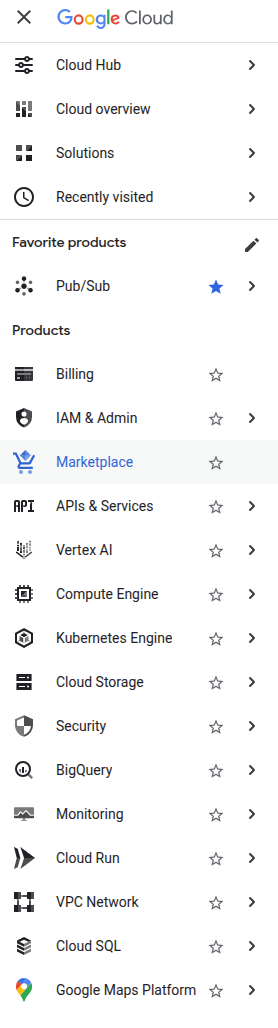
-
Click Your orders on the left.
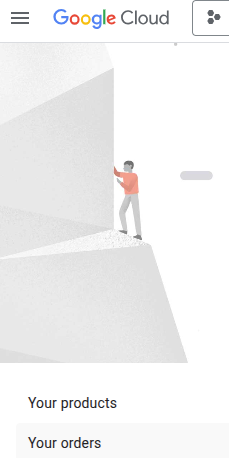
-
Find the current Active order for ClearBlade IoT Core. This is the EXISTING order which you will eventually cancel. Don’t cancel the order yet. Copy and store the Order number.
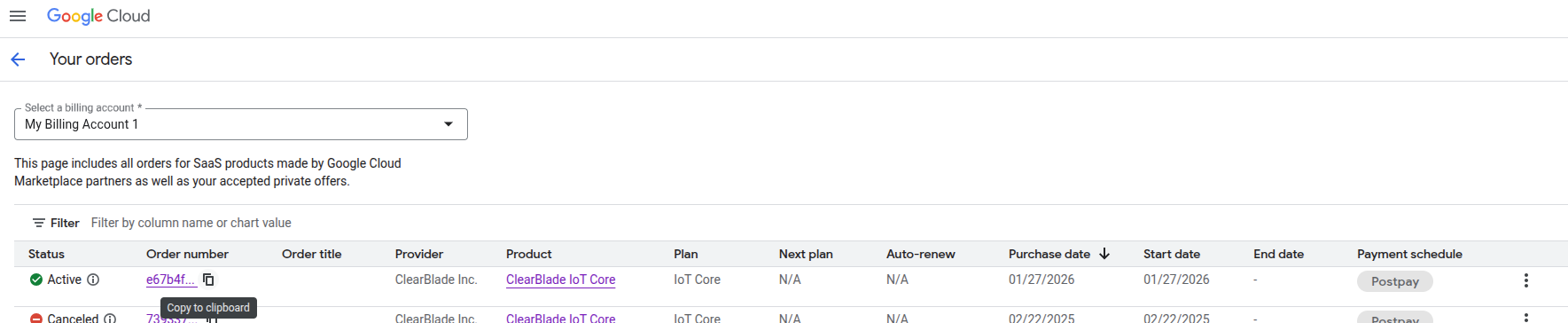
-
Purchase ClearBlade IoT Core with your new Billing Account. Copy and store that new Order number.
-
Make sure there is at least one representative of your organization authorized to conduct billable activities registered with ClearBlade IoT Core here. Store the email addresses of those representatives.
NOTES:-
These representatives must be the ones who create PROJECT AREAS within ClearBlade IoT Core.
-
These representatives can add other registered users to project areas by following this.
-
Once added to a project area any user can add other registered users to that project area using the link provided in the previous step.
-
-
Submit a ticket to the ClearBlade Service Desk using this. Make sure to include in the ticket:
-
The old Order number.
-
The new Order number.
-
The email addresses registered in ClearBlade IoT Core to associate with the new order.
-
-
ClearBlade will use the information provided to move billing over from the old order to the new order and will confirm the completion of this task via the Service Desk ticket.
-
Upon receiving confirmation of the change from ClearBlade feel free to close the old order.