
Preloaded services using the clearblade_async library
Introduction
When a microservice handles HTTP requests, resources are spun up when the request comes in, and those are torn down at the end when a response is returned. If requests come in often enough, then the spin up / tear down activities can be a load on the environment. To avoid that load a microservice can be converted to a preloaded service.
Configuration
The configuration parameters that differentiate a code service as a preloaded service are found in the service’s Concurrency Setings in the Settings tab. The settings are chosen the same as a stream service:
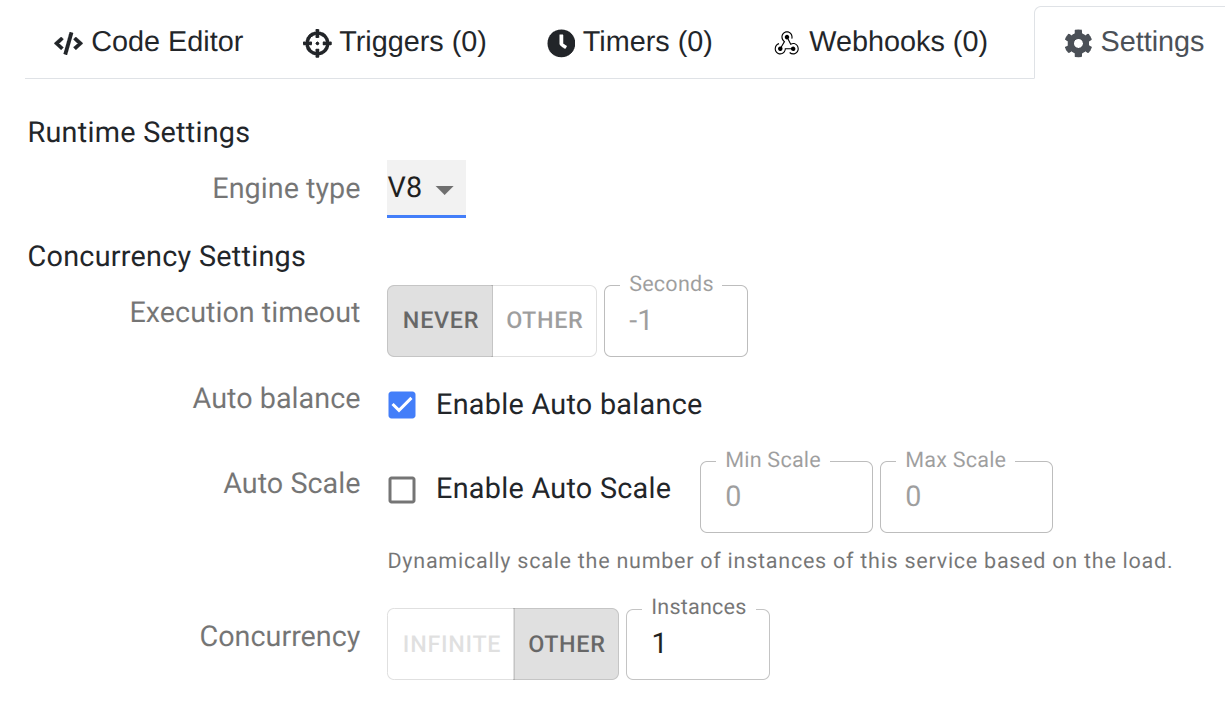
Execution timeout set to NEVER.
Auto balance selected. This is optional but recommended. This setting ensures the number of instances of the stream service running is the same on each pod / node in the environment. This setting also ensures that instances are restarted if they stop due to a failure.
Enable Auto Scale. If selected this allows setting a range for the number of instances of this stream service per pod / node. Selecting this disables the subsequent Concurrency setting.
Concurrency. If Enable Auto Scale is not selected, then this must be set to a finite integer of value 1 or more. This defines a static number of instances of the stream service to run per pod / node.
Code in a Preloaded Service
The code in a preloaded service is the same as a microservice with a decorator / wrapper around the core code.
Look at the clearblade_async library’s README to see how to convert a microservice into a preloaded service. Specifically look at the Preloader and Preloader example sections.